How to A/B Test a Form in Framer and See Which Variant Won
Run an A/B split test on a native Framer form by tagging layers [A] and [B]. Visitors keep their variant, and each submission says which one they saw.

Dong Trinh
Lead Architect at FramerSend
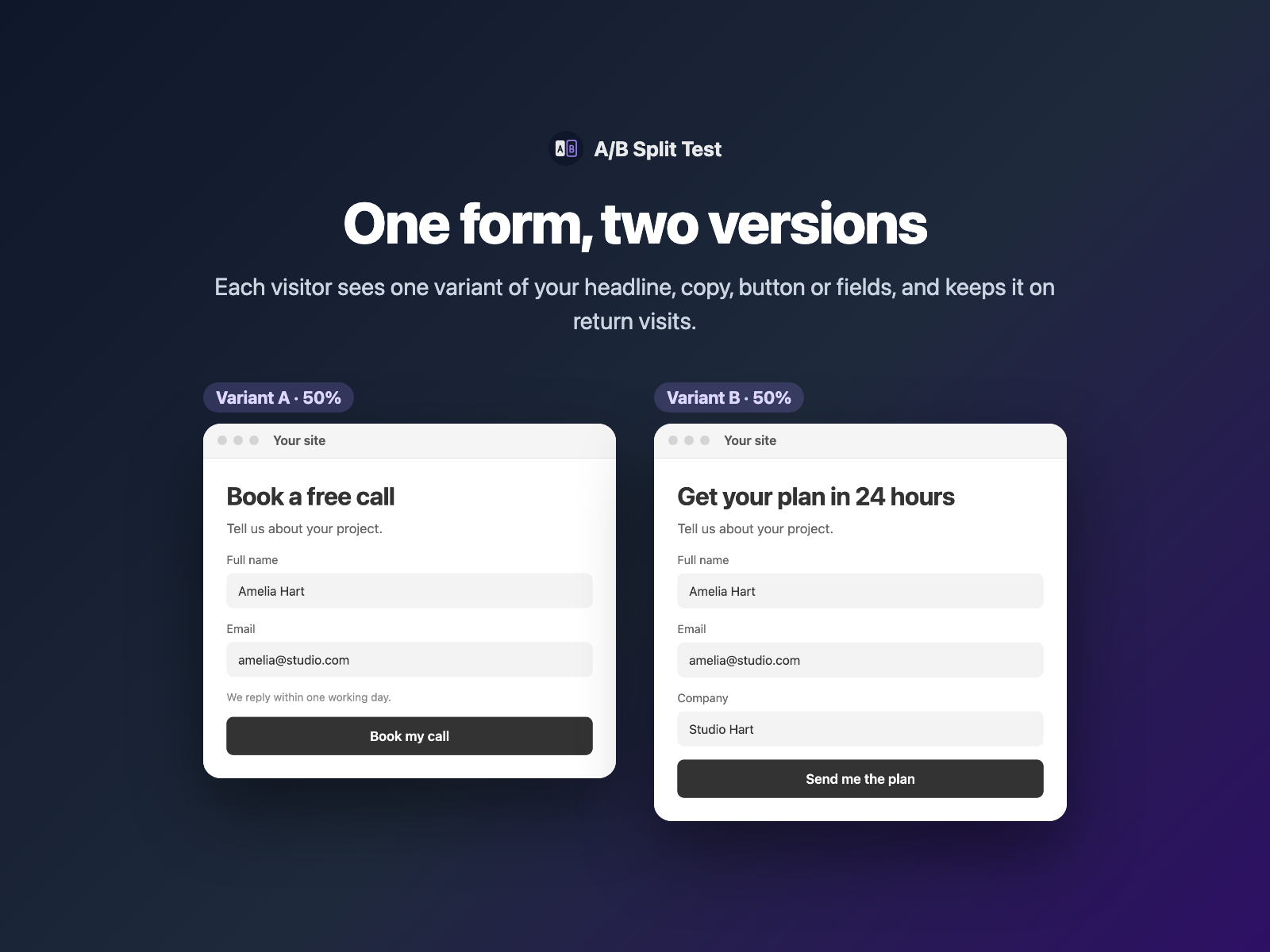
You changed the headline, shortened the form or rewrote the button. Did more people submit? Without a test, you are guessing.
A/B Split Test lets you show two to four versions of a form page on your native Framer site. Each visitor sees one version, and every submission says which one.
Why test your form page
Small copy changes can move the number of leads. A form is a good place to test because the goal is clear: a submission.
Things worth testing:
- the headline above the form;
- the intro text and the button label;
- the number of fields, or an extra field;
- a short form against a long form.
Run one change at a time, so you know what caused the difference.
Two pages vs A/B Split Test
| Two separate Framer pages | A/B Split Test |
|---|---|
| You build, link and keep two pages in sync. | One page. Tag layers [A] or [B] by name. |
| You need your own way to split traffic. | Set the weights, for example A 50% and B 50%. |
| Visitors may see a different version on return. | A visitor keeps their variant. |
| You compare pages in analytics. | Each submission carries Variant=A or Variant=B. |
How A/B Split Test picks and remembers a variant
- Tag layers by name, for example "Headline [B]". Layers without a tag always show. You can tag the selected layer from the panel.
- Set two to four variants with names and weights.
- A visitor gets one variant and keeps it on return visits.
- The form sends it in a hidden field called
Variant(or the name you choose). Fields inside a hidden variant are not required or sent. - Optional analytics. A
form_variant_viewevent goes to GA4 or Google Tag Manager, so you have views per variant. - Optional end date. After it, everyone sees the winner.
A head snippet hides tagged layers until the page loads, so there is no flash of the wrong version. The test adds a small inline script, loads no external scripts and makes no network requests.
Run a form A/B test in three steps
- Select a layer and click Tag selected [B] in A/B Split Test. Its name becomes "Headline [B]". Tag the [A] layers the same way.
- Set the variants and weights.
- Select your Form and click Insert A/B test. It is invisible on your site. Publish, then check each version with
?variant=Aand?variant=B.
A/B Split Test is coming in FramerSend Fields 1.4.0. To test two entirely different forms, tag one form [A] and the other [B], and put an A/B Split Test with the same field name in each.
Read the results
The result is a rate for each variant:
submissions for the variant ÷ views for the variant
Count submissions by the Variant field in your inbox, spreadsheet or CRM. Take views per variant from the form_variant_view event in GA4 or GTM. The variant with the higher rate is ahead.
There is no FramerSend results dashboard yet, so you do the division yourself. Let the test run until you have a good number of submissions in each variant. A handful is not enough to decide. To track where else your form loses people, see form analytics for Framer forms.
What we tested
On a real published Framer site, ?variant=B showed the [B] layer and hid the [A] layer. The automated checks passed too: 75 of 75 harness checks and 41 of 41 plugin-panel checks.
Try A/B Split Test in FramerSend Fields 1.4.0. Every FramerSend plan includes it, from $5/month after a 14-day free trial with no card. To show or hide fields in the winning version, read conditional logic in Framer forms.
Frequently asked questions
How do I A/B test a form in Framer?
Tag layers by name, such as Headline [B], then select your native form and insert A/B Split Test. Each visitor sees one variant, picked by the weights you set, and the form sends Variant=A or Variant=B with every submission.
Do visitors keep the same variant?
Yes. The variant is kept in the visitor's browser, so they see the same version when they come back.
How do I check each version?
Add ?variant=A or ?variant=B to the page URL. In our test on a published Framer site, ?variant=B showed the [B] layer and hid [A].
Will visitors see a flash of the other version?
No. A head snippet hides tagged layers until the page loads, so the wrong version does not flash on screen.
How do I see which variant won?
Count submissions per variant and divide by the views per variant, which you can send to GA4 or Google Tag Manager with the optional form_variant_view event. FramerSend has no results dashboard for this yet.
What does it cost?
A/B Split Test is included in every FramerSend plan, from $5/month, after a 14-day free trial with no card. It is coming in FramerSend Fields 1.4.0.
Connect Framer to 100+ CRMs in 60 seconds
14-day free trial, no card needed. Copy your Submit URL and paste straight into Framer.
Related Articles
How to Fill a Framer Form Dropdown from a CMS Collection
Build a dropdown, radio list, buttons or checkboxes in a native Framer form from CMS items such as services or locations, and refresh the options when the CMS changes.
How to Validate an IBAN or VAT Number in a Native Framer Form
Check IBAN check digits and EU VAT numbers as visitors type in a native Framer form, block the submit while the value is wrong and send a clean value.
How to Add a QR Code and Barcode Scanner to a Native Framer Form
Let visitors scan a QR code or barcode into a native Framer form field, or scan from a photo, and send the decoded text with the form.