How to Show Personalized Quiz Results and Outcome Cards in Native Framer Forms
Turn Quiz Score totals, Calculator quotes and dropdown answers into tailored result cards with their own badge, headline and CTA — inside native Framer forms.

Dong Trinh
Lead Architect at FramerSend
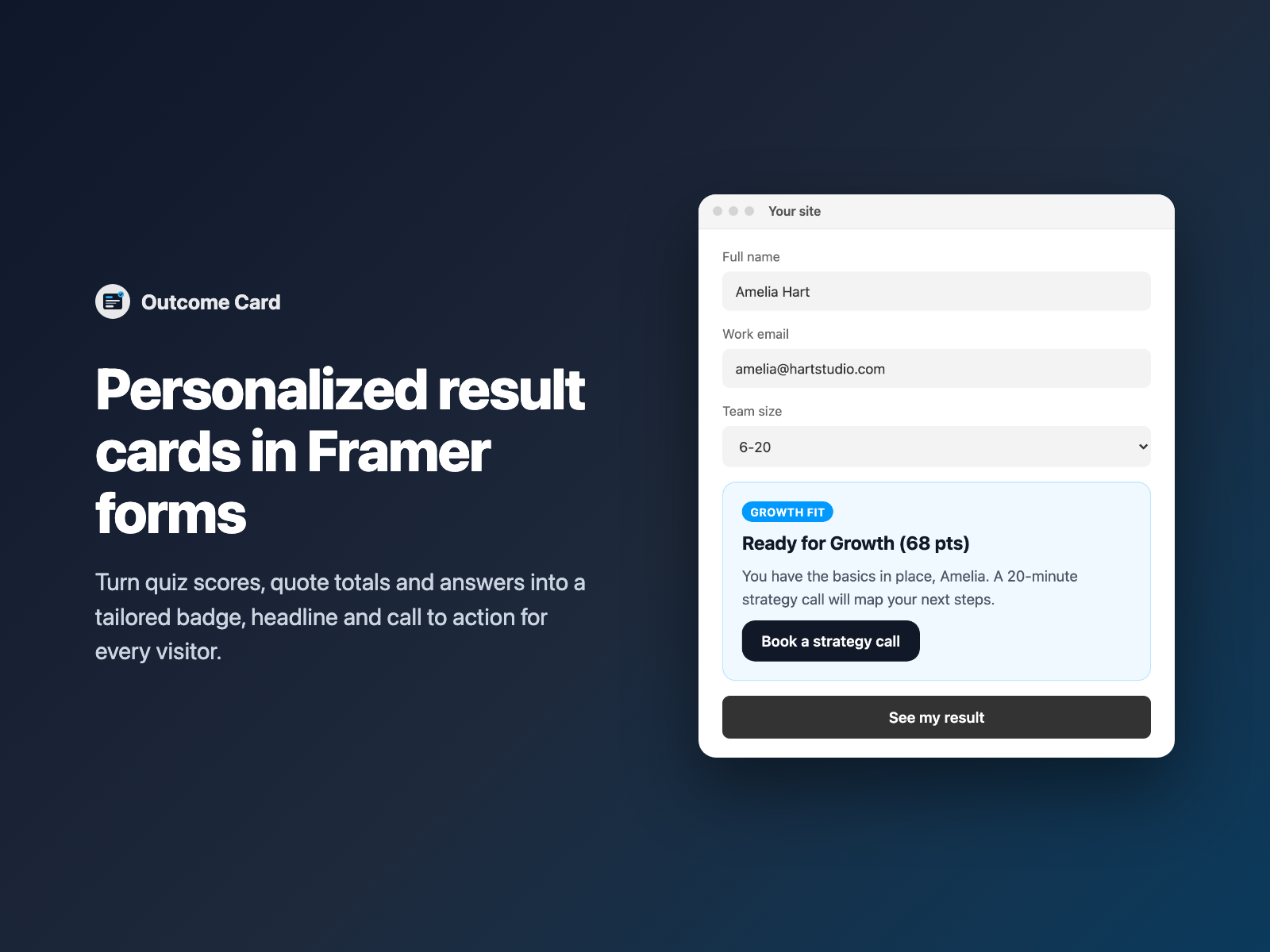
Quizzes, assessments, quote calculators and plan finders all end the same way on most Framer sites: a generic "Thanks, we'll be in touch" message. The visitor just told you their score, their budget or their team size — and the page gives nothing back.
Outcome Card turns that answer into a tailored result card inside your native Framer form: a badge, a headline, an explanation and a call-to-action button chosen by the visitor's score or answer.
Why a personalized result beats a generic thank-you message
Showing each visitor a result that matches what they entered solves three common problems for lead-gen quizzes and pricing funnels:
- A reason to finish the quiz. A visitor who scored 68 on a readiness quiz sees "Ready for Growth (68 pts)" with a next step, instead of a blank confirmation.
- The right CTA for each lead. Low scores can get a starter guide, mid scores a strategy call and top scores a sales contact — each outcome has its own button and link.
- Context for your team. The matched outcome can be sent with the submission as a hidden
Outcomefield, so HubSpot or your inbox shows which tier the lead landed in.
Separate result pages vs an Outcome Card inside the form
| One Framer page per result + redirect logic | Outcome Card inside a native Framer form |
|---|---|
| You design and maintain a separate page for every tier, then route visitors to it. | One component holds every outcome: badge, title, description, CTA label and CTA link per row. |
| Personal details are lost unless you pass them through the URL. | {Name:first} (with a fallback) and {value} render live in titles, descriptions and CTA links. |
| The visitor leaves the form to see the result. | The card appears in place — live as they answer, once the watched field is answered, or after a valid submit. |
If you do want to send each tier to its own page, Conditional Redirect handles that; Outcome Card is for showing the result right where the form is.
How Outcome Card matches scores and answers to outcomes
Outcome Card watches one field in your form by name (case-insensitive) — a Quiz Score total (Score), a Calculator total (Total, including formatted values such as $1,250/mo), an NPS Score, a dropdown or a radio group:
- Plain-text outcome rules — numeric ranges
0-39,80+,<40,>=80; exact text=Enterpriseor a list=Starter, Growth; partial text~enterprise; wildcards*(the fallback) and*agency*. Rules are parsed withoutevaland the first match wins. - Live personalization tokens —
{value}(the watched answer) and{Field:first | fallback}with:first,:upper,:lowerand:titlework in the badge, title, description, CTA label and CTA link. Token values in links are URL-encoded, and only http(s), mailto, tel, relative and#links are rendered. - Three display modes — Live (updates as visitors answer), Answered (appears once the watched field has a value) or Submitted (appears after a valid submit; a submit stopped by another FramerSend field's validation does not reveal it).
- Per-outcome CTA — open a link, open it in a new tab, submit the form, or show no button.
- Optional hidden fields —
Outcome(the matched title) andOutcome tier(the badge) are added to the submission when enabled.
Fields inside blocks hidden by Conditional Fields read as empty, and the component loads no external scripts and makes no network requests.
Add a personalized result card in three steps
- Select your native Form (for example next to Quiz Score or Calculator) on the Framer canvas, open FramerSend Fields, and pick Outcome Card.
- Choose the Quiz, Quote Tier or Plan Recommender preset, set the watched field, and edit the outcome rows — rule, badge, title, description and CTA.
- Click Insert outcome card, preview each tier on the canvas, style colors and fonts in Framer's right-hand panel, and publish.
The presets are starting points: Quiz watches Score with 0-39, 40-79 and 80+ tiers and reveals after submit; Quote Tier watches Total live with <500, 500-1999 and 2000+; Plan Recommender watches Team size with exact-text rules and a * fallback.
Combine Outcome Card with Quiz Score, Calculator and your CRM
- Scored lead quizzes: total answers with Quiz Score, show the tier with Outcome Card in Submitted mode, and route the hidden
Outcome tierto HubSpot or Airtable. - Live quote tiers: point Outcome Card at a Calculator
Totalin Live mode so the recommended package and its CTA change as visitors adjust their options. - Multi-step plan finders: place it on the last step of a Multi-Step Form, and use Answer Piping for personalized headings on earlier steps.
What we tested
We ran 27 automated Playwright harness checks and 20 plugin-panel checks covering numeric ranges and boundaries (0-39, 80+, <500, >=2000 on $12,000), exact, list and partial text rules, * fallbacks, {Name:first | friend} fallbacks and :upper, all three display modes, no reveal on an invalid submit, reveal on a valid Enter-key submit, watched fields inside [data-fs-cond-hidden] blocks, Framer honeypot name prefixes, blocked javascript: CTA links, the three presets, insertion above the submit button, and zero external network requests.
Try Outcome Card inside FramerSend Fields along with all 74 Framer form fields and 110+ connectors — 14-day free trial with no card, then from $5/month.
Frequently asked questions
How do I show a personalized quiz result in a Framer form?
Add Quiz Score to total the answers, then insert Outcome Card next to it and point Watch field at Score. Each outcome rule (for example 0-39, 40-79, 80+) shows its own badge, title, description and CTA button inside your native Framer form.
Which rules can Outcome Card match?
Numeric ranges such as 0-39, 80+, <40 or >=80, exact text such as =Enterprise or a list like =Starter, Growth, partial text such as ~enterprise, and wildcards such as * as the fallback. Rules are checked top to bottom and the first match wins.
Can the result appear only after the visitor submits?
Yes. Set Display to Submitted. The card appears after a valid submit and keeps the answers from that moment, so it survives Framer's form reset. Live updates as visitors answer, and Answered appears once the watched field has a value.
Can I personalize the result text with the visitor's name?
Yes. Badges, titles, descriptions, CTA labels and CTA links accept {value} (the watched answer) and {Field:first | fallback} tokens, for example {Name:first | friend}, with :first, :upper, :lower and :title modifiers.
Is the matched outcome sent to my CRM with the submission?
Optionally. Turn on the hidden Outcome field (the matched title) and Outcome tier field (the badge) and they are submitted with the rest of the form answers to your inbox or connector.
Where do I install Outcome Card for Framer?
Open FramerSend Fields on the Framer Marketplace (74 fields in one plugin) and select Outcome Card. Every FramerSend plan includes it from $5/month after a 14-day free trial with no card.
Connect Framer to 100+ CRMs in 60 seconds
14-day free trial, no card needed. Copy your Submit URL and paste straight into Framer.
Related Articles
How to Connect Framer Forms to Any CRM in 2026 (No Code & No Zapier)
A complete step-by-step tutorial on routing native Framer form submissions directly into Klaviyo, HubSpot, Mailchimp, or Salesforce in under 60 seconds.
Framer Form Not Sending? 9 Fixes for Submissions That Never Arrive
Framer form not sending or submissions not arriving? Work through 9 fixes: publishing, Send To settings, validation, spam filters, webhooks and field names.
How to Add Camera Capture and Mobile Photo Upload to Native Framer Forms
Let visitors snap 1–6 photos with a live rear or front camera in your native Framer form, compressed in the browser and uploaded to FramerSend storage or your own bucket.