How to Add Answer Piping (@Recall) to Native Framer Forms
Pipe earlier answers, first names and live Calculator totals into headings and multi-step prompts inside native Framer forms — without Typeform iframes.

Dong Trinh
Lead Architect at FramerSend
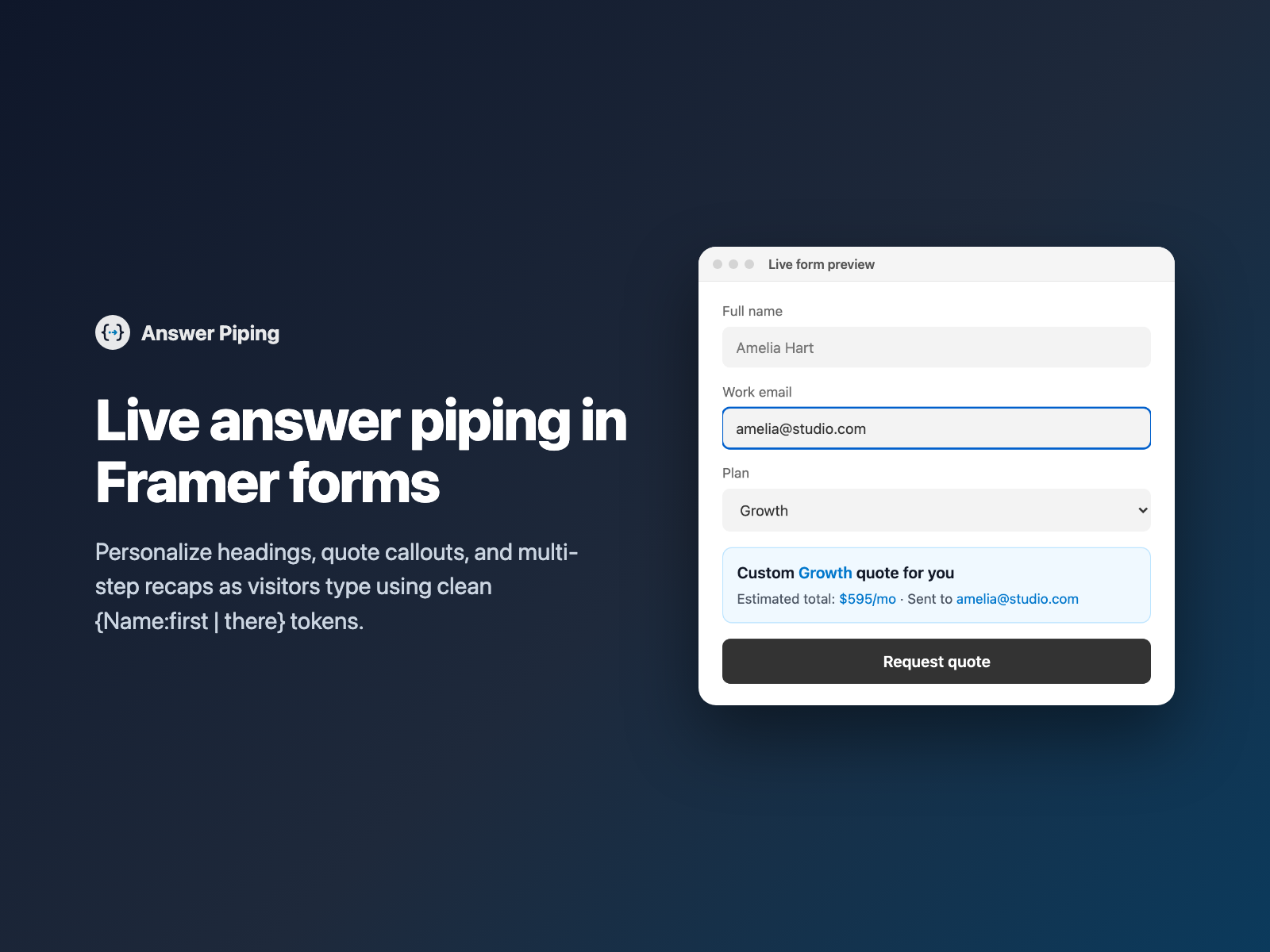
Conversational forms convert better when they acknowledge what the visitor just told you. Instead of generic step headings like "Step 2: Project Details" or "Submit Quote Request", high-converting funnels greet buyers by first name and reflect their scope back in real time: "Nice to meet you, Amelia — let's scope Stripe's Growth rollout ($595/mo)".
Answer Piping brings Typeform-style @recall interpolation directly into native Framer forms — keeping 100% of your Framer layout, fonts and zero-iframe page speed.
Why personalized answer piping lifts form completion
Reflecting a visitor's answers back to them across a form solves three common UX problems in B2B intake and service estimators:
- Conversational momentum. Addressing a lead as
{Name:first | there}in Step 2 of a Multi-Step Form makes a structured qualification flow feel tailored rather than bureaucratic. - Instant quote clarity. Pairing live text with Calculator lets visitors see "Your estimated {Plan} retainer is {Total}" update on every slider move or checkbox toggle before they commit their email.
- Fewer wrong submissions. Echoing key selections right above the submit button catches typos in email addresses, dates or package tiers before the payload hits HubSpot.
Why switching to Typeform or Tally just for @recall hurts conversion
Many Framer designers abandon native Framer forms for third-party iframe builders solely because they want dynamic @recall text. That trade-off introduces heavy costs:
| Embedded Typeform / Tally iframe | Answer Piping inside a native Framer form |
|---|---|
| Loads 300–600 KB of external JavaScript inside a scrollable iframe box that clashes with your Framer typography. | Renders as a lightweight React component inside your own Framer DOM with zero external scripts or network calls. |
| Charges $29–$83/month just to remove third-party branding and unlock logic + recall variables. | Included with all 72 Framer form fields and 110+ connectors from $5/month. |
| Breaks native Framer animations, custom cursors and responsive Stack layouts on mobile. | Supports native Framer font controls, plain headings (h2, h3, p) or styled callout cards with accent badges. |
How Answer Piping interpolates live fields safely
Answer Piping is a pure string parser (zero eval(), zero new Function(), zero external dependencies) engineered specifically for Framer's form DOM:
- Flexible
{Field | fallback}syntax — matches inputs case-insensitively byname,aria-labelor placeholder. WriteHi {Name:first | there}, ready to scale {Company | your team}?and it updates on every keystroke or selection change. - Smart text modifiers — format piped tokens inline with
:first(extractsAmeliafromAmelia Hart),:upper,:lowerand:titlewithout writing custom React code overrides. - Honeypot & conditional awareness — ignores Framer's 11 invisible
aria-hidden="true"spam traps and automatically treats fields hidden by Conditional Fields as empty so deselected add-ons disappear cleanly. - Optional CRM summary field — toggle Send rendered text to include the final interpolated sentence as a hidden field (for example
Summary text) in your email notification or webhook payload.
Add live {Field} piping in three steps
- Select your native Form (or a step container inside your form) on the Framer canvas, open FramerSend Fields, and pick Answer Piping.
- Choose a Greeting, Quote summary or Step recap preset — or write your own template using
{Field:modifier | fallback}tokens — and click Insert answer piping. - Pick Plain text or Callout card, customize typography and accent highlight colors in Framer's right-hand panel, and publish.
Combine Answer Piping with Multi-Step Form, Calculator and Quiz Score
Answer Piping shines brightest when chained with interactive FramerSend fields:
- Multi-step B2B onboarding: collect
NameandCompanyin Step 1 of Multi-Step Form, then title Step 2 "What is {Company}'s monthly lead volume, {Name:first}?" while validating corporate domains with Work Email. - Live pricing & promo recaps: combine Calculator and Coupon Code to display a highlighted callout card above your submit CTA — or pair with Form Summary when you also want a full line-by-line review table.
- Graded assessments: read live point totals from Quiz Score to show personalized benchmark feedback before the visitor requests their full audit report.
What we tested
We ran 13 automated Playwright harness checks and 6 plugin-panel checks verifying real-time interpolation across text inputs, selects, radio groups and multi-checkboxes, :first/:upper/:lower/:title modifiers, pipe fallbacks, hideWhenMissing gating, accent-highlighted token spans, zeroing values inside data-fs-cond-hidden Conditional Fields wrappers, skipping Framer aria-hidden honeypots, hidden Summary text FormData capture, and zero external network requests.
Try Answer Piping inside FramerSend Fields along with all 72 Framer form fields and 110+ connectors — 14-day free trial with no card, then from $5/month.
Frequently asked questions
What is answer piping in a Framer form?
Answer piping (called @recall in Typeform and Tally) dynamically inserts what a visitor typed or selected in an earlier field straight into headings, question prompts or quote callouts later in the same native Framer form.
What displays before the visitor fills out the referenced field?
You can provide an inline fallback such as {Name:first | there} so the heading reads 'Hi there' until a name is entered, or enable Hide when missing to reveal the block only after the referenced inputs have values.
Can Answer Piping extract just a visitor's first name?
Yes. Use the :first modifier ({Name:first | friend}) so 'Amelia Hart' renders cleanly as 'Amelia'. Built-in :upper, :lower and :title modifiers are also supported.
Does Answer Piping work across Multi-Step Form steps and Calculator?
Yes. It listens to native Framer inputs across all steps as well as live outputs from Calculator, Quiz Score, Coupon Code, dropdowns, radio groups and checkboxes.
What happens when Conditional Fields hides an input referenced in a template?
Inputs inside branches hidden by Conditional Fields are treated as empty automatically, ensuring stale values from a deselected option never leak into your live text or submitted summary.
Where do I install Answer Piping for Framer?
Open FramerSend Fields on the Framer Marketplace (74 fields in one plugin) and select Answer Piping. Every FramerSend plan includes it from $5/month after a 14-day free trial with no card.
Connect Framer to 100+ CRMs in 60 seconds
14-day free trial, no card needed. Copy your Submit URL and paste straight into Framer.
Related Articles
How to Connect Framer Forms to Any CRM in 2026 (No Code & No Zapier)
A complete step-by-step tutorial on routing native Framer form submissions directly into Klaviyo, HubSpot, Mailchimp, or Salesforce in under 60 seconds.
Framer Form Not Sending? 9 Fixes for Submissions That Never Arrive
Framer form not sending or submissions not arriving? Work through 9 fixes: publishing, Send To settings, validation, spam filters, webhooks and field names.
How to Show Personalized Quiz Results and Outcome Cards in Native Framer Forms
Turn Quiz Score totals, Calculator quotes and dropdown answers into tailored result cards with their own badge, headline and CTA — inside native Framer forms.