New in FramerSend: Flows, 12 new connectors, 30 form templates and new form fields
FramerSend Flows send one Framer form to many tools at once, with If/Then branches on a visual canvas. Plus 12 new connectors, 30 form templates (10 free) and new form fields.

Dong Trinh
Lead Architect at FramerSend
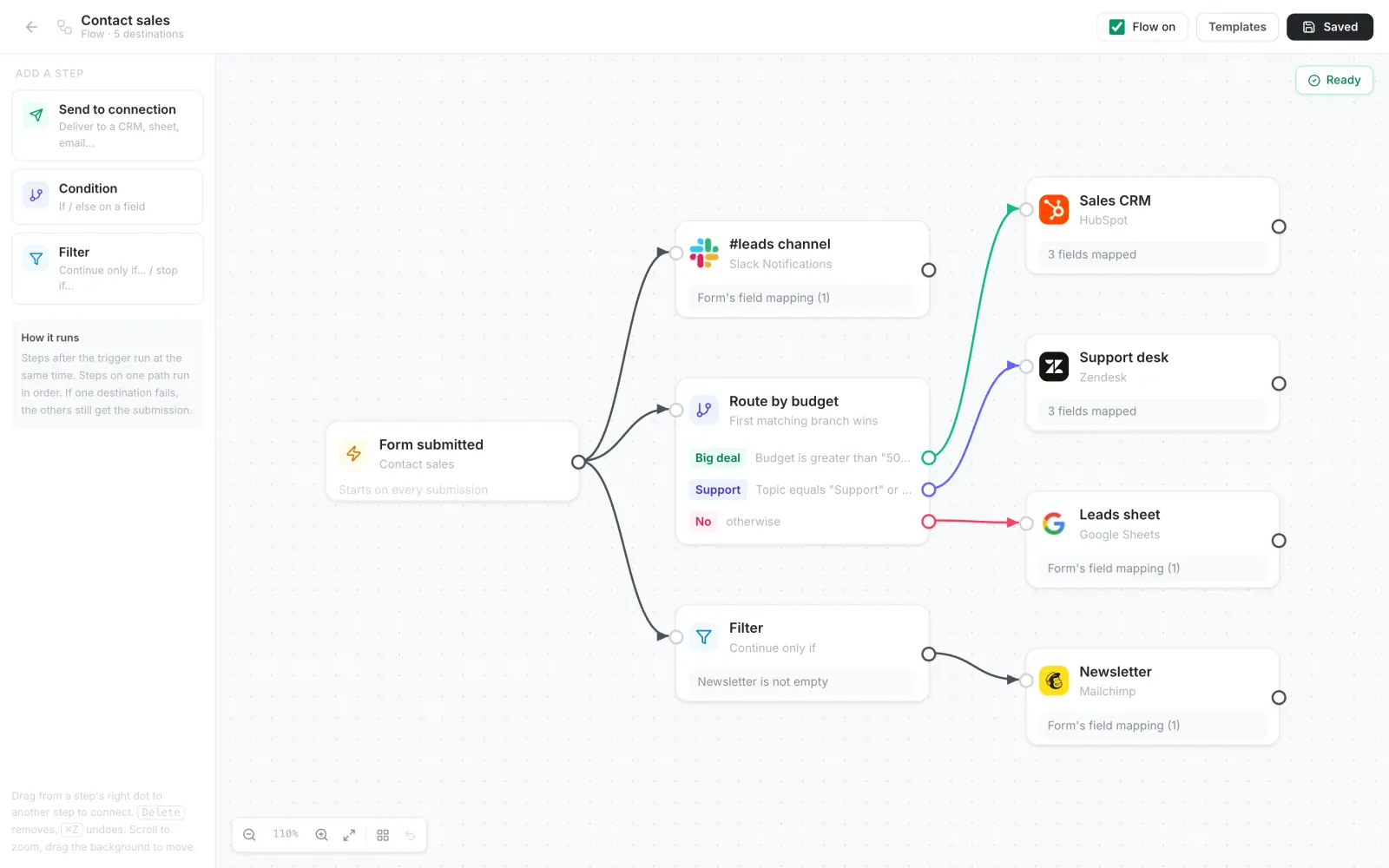
Until today, a FramerSend form sent its submissions to one connection. Now one Framer form can send to your CRM, your sheet, your team chat and your ad pixel at the same time, and route each submission by what the visitor answered. Here is everything that went live on 24 November 2026.
Flows: one Framer form, many tools
Flows let you decide where each submission goes. You draw it on a visual canvas: the form on the left, your tools on the right, and lines that connect them. Drag a step in from the side panel, then drag from a step's dot to the next step to link them.

There are three kinds of steps today:
- Send delivers the submission to one of your connections, such as a CRM, a Google Sheet, Slack or an email tool.
- Condition adds If/Then branches based on the visitor's answers.
- Filter lets a path go on only when its rules match, or stops it when they do.
Send to many tools at once
Add a Send step for each tool. Steps that come straight after the form run at the same time, so every tool gets the submission together, not one after another. You no longer have to pick a single "main" tool and copy data around by hand.
Field mapping per step
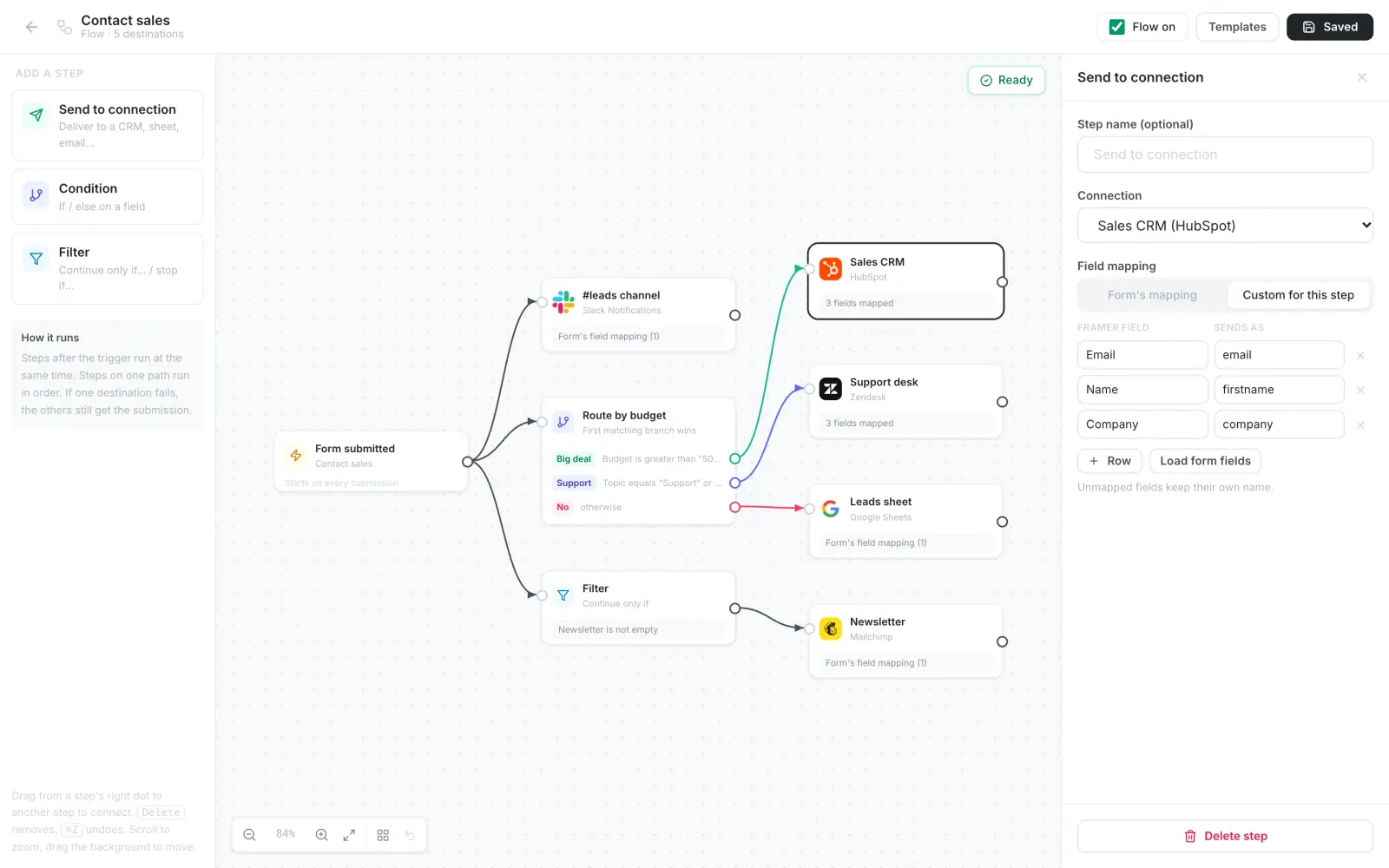
Each Send step can use the form's own field mapping, or its own custom mapping. Your CRM might want firstname while your sheet wants Name: map each one the way that tool expects. Fields you leave unmapped keep their own name.
If/Then branches: route each submission by its answers
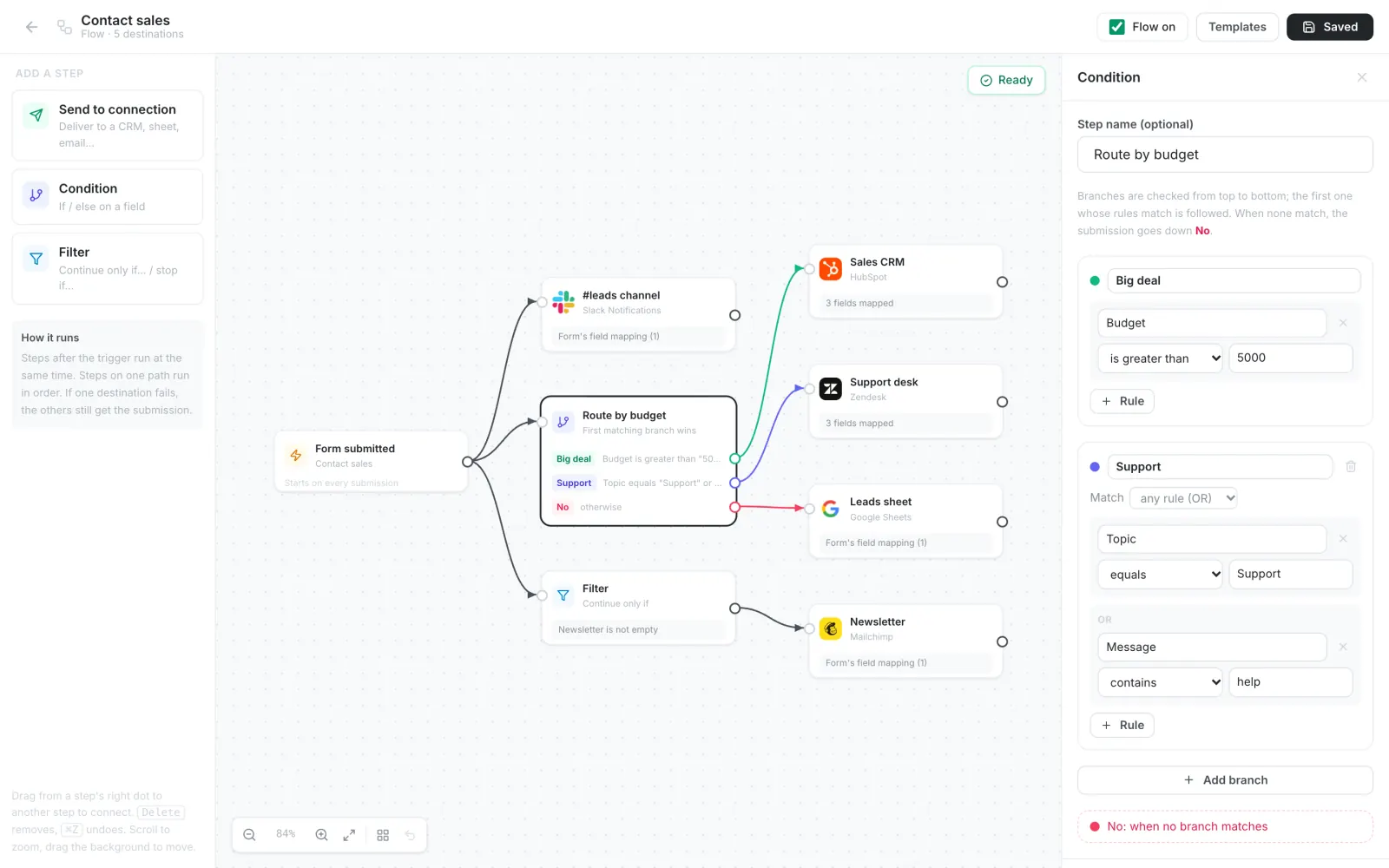
A Condition step checks its branches from top to bottom and follows the first one that matches. If nothing matches, the submission takes the "No" path. You can add up to 6 branches per Condition.
Rules can be joined with AND or OR, and there are 8 operators: equals, does not equal, contains, does not contain, is greater than, is less than, is empty and is not empty.
A few flows you can build in minutes:
- If Budget is greater than 5000, send to HubSpot, otherwise to Google Sheets. Always notify Slack.
- If Topic equals Support, send to Help Scout, otherwise to your CRM.
- If the newsletter opt-in is not empty, send to Mailchimp. Otherwise a Filter stops the path.
- If Country equals Germany, send to rapidmail, otherwise to Klaviyo.
- Always send every submission to Notion, the Meta Conversions API and WhatsApp.
Not sure where to start? Flow templates give you a working flow in one click: send to one, send to two at once, or route by a field value.
Reliable delivery: re-send only what failed
When you send one form to five tools, one of them will have a bad day sooner or later. Flows are built for that:
- Each destination is logged on its own, with its status and its error.
- One failing tool never blocks the others.
- Retry re-sends only the destinations that failed, so the tools that already got the submission do not get it twice.
- The submission log names each destination that failed and why.
Your visitors notice nothing. The submit works the same way it always did.
Your existing forms do not change. A form with one connection keeps working exactly as before. Open Dashboard → Forms → Flow only when you want more than one destination or branches. Turn a flow off any time and the form goes back to its single connection.
Flows are included in every plan and in the 14-day free trial. There is no extra price for Flows.
Two things to know: you can view a flow on your phone, but editing needs a larger screen, since you drag and connect steps on the canvas. And there is no delay or wait step yet: steps run as soon as the form is submitted.
120+ connectors, with 12 new ones
Flows work with every connector in the FramerSend connector library, which now has more than 120. These 12 are new:
- WhatsApp: get a WhatsApp message for every submission, through the WhatsApp Business Cloud API.
- Meta Conversions API: send a Lead event to your Meta pixel, with hashed customer data for better ad matching.
- TikTok Events API: send a SubmitForm event to your TikTok pixel, with hashed email and phone.
- Kommo (amoCRM): create a lead with its contact, tags and a note with every answer.
- PostHog: capture an event with the answers as properties, with the person identified by email.
- Amplitude: track an event with the answers as event properties.
- Resend Contacts: add visitors to your contacts and segments, ready for Broadcasts.
- Twenty CRM: create or update a person (cloud or self-hosted), with company and a note.
- folk CRM: add people with group custom fields and a note with every answer.
- Lark / Feishu: post each submission to a group chat as a card.
- Cal.com: add form visitors to your Contacts, with tags.
- rapidmail: add recipients to a list with double opt-in, made for German-speaking newsletters.
Put these together with Flows and one form can tell your ad platforms about a lead, add it to your CRM and ping your team, all from a single submit.
30 Framer form templates, 10 free
Starting from a blank form takes time. The template library now has 30 ready-made forms. 10 are free, with no account needed. The other 20 are Pro: they come with every plan and the 14-day free trial. Together they cover the jobs most sites have: contact, quotes, appointments, table reservations, RSVPs, job applications, volunteer signups, waitlists, client onboarding, orders, donations, support and tech support, bug reports, returns, events, shopper surveys, NPS, lead qualification, trivia quizzes and price calculators.
Insert one into your Framer project in one click. They are native Framer forms, so every layer stays editable. Then send the entries to your inbox or to any of the 120+ tools, or to many of them with a flow.
80 form fields, including a new Password field
FramerSend form fields add what Framer forms do not have out of the box: international phone numbers, signatures, ratings, time slots, addresses, live totals, conditional logic and more. Each field inserts into your native Framer form in one click.
New and improved in this release:
- Password: a password field with a strength meter and rules.
- Word Counter and Rich Text Editor: both can now grow with the text, so long answers stay readable. Turn on Auto height and set the layer's height to Fit in Framer.
13 basic fields work with no account at all, free forever. The other fields are Pro, like file uploads, multi-step forms and bookings. Pro fields come with every plan and the 14-day free trial, no card needed. Signed up before November 25, 2026? Your account keeps every field and template free.
Pricing
Every plan includes every connector and Flows. Plans differ only by how many sites they cover. For one site:
| Billing | 1 site |
|---|---|
| Monthly | $5/month |
| Yearly | $39/year |
| Lifetime | $69 one-time |
Every new account starts with a 14-day free trial of every connector and Flows, no credit card required. Plans for more sites are on the pricing page.
Build your first flow free
Connect your Framer form, add a second tool, and watch one submission reach both. It takes a few minutes, and the first 14 days are on us.
Connect Framer to 120+ CRMs in 60 seconds
14-day free trial, no card needed. Copy your Submit URL and paste straight into Framer.
Related Articles
How to Fill a Framer Form Dropdown from a CMS Collection
Build a dropdown, radio list, buttons or checkboxes in a native Framer form from CMS items such as services or locations, and refresh the options when the CMS changes.
How to Validate an IBAN or VAT Number in a Native Framer Form
Check IBAN check digits and EU VAT numbers as visitors type in a native Framer form, block the submit while the value is wrong and send a clean value.
How to Add a QR Code and Barcode Scanner to a Native Framer Form
Let visitors scan a QR code or barcode into a native Framer form field, or scan from a photo, and send the decoded text with the form.