How to Pass Framer CMS Variables (Job Title, Slug or SKU) Into Form Submissions
Know which job post, property listing or product page sent a Framer form submission. Bind up to 5 CMS Collection fields via Set Variable (+) with zero code.

Dong Trinh
Lead Architect at FramerSend
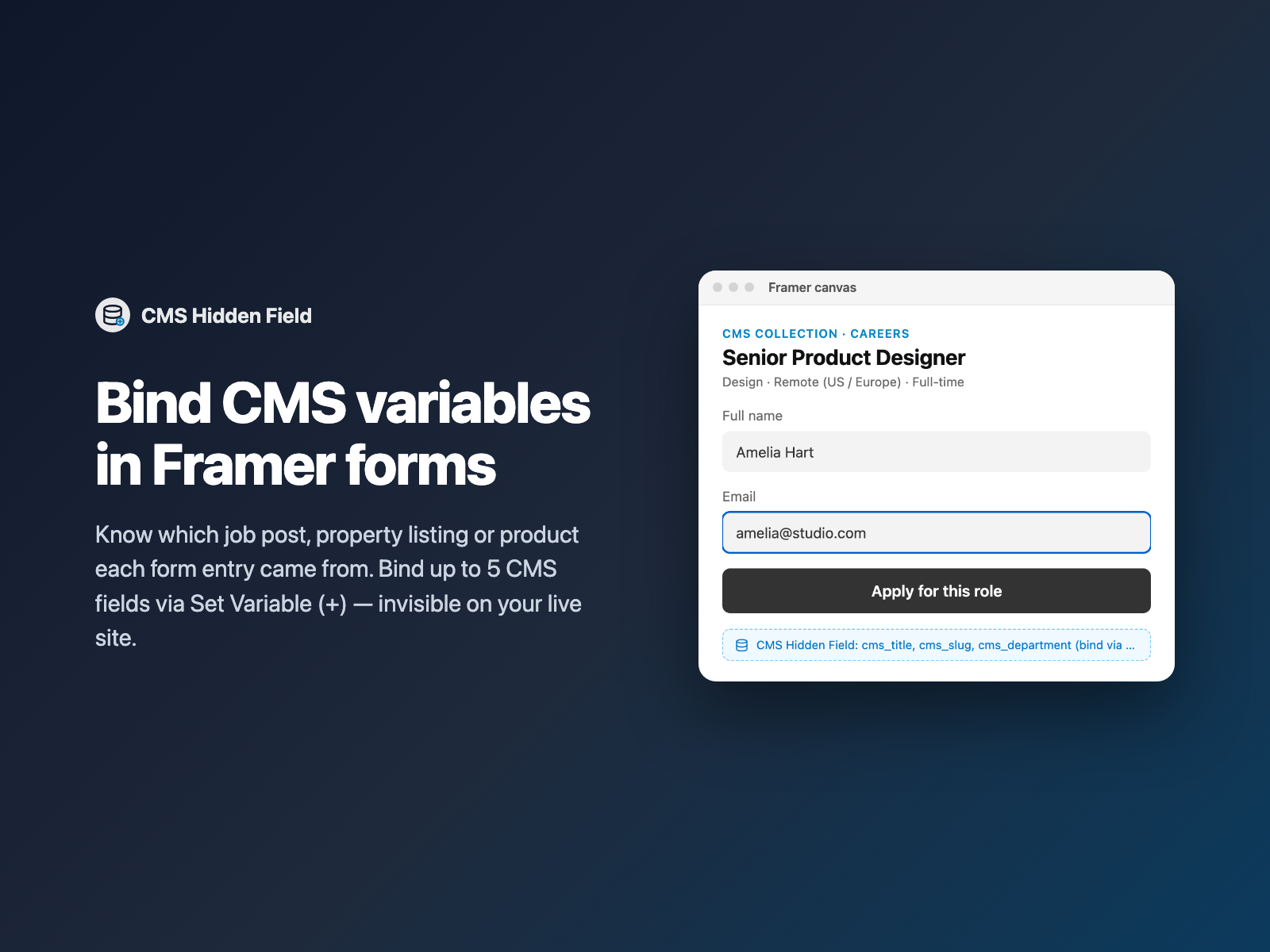
When you place a native Framer Form on a CMS Collection detail template — /jobs/[slug], /properties/[slug], /case-studies/[slug] or /products/[slug] — every page shares the exact same form. Without item context, an inquiry arrives in your inbox or CRM with the visitor's name and email, leaving your team to ask "Which job role or property listing did they apply for?"
CMS Hidden Field solves this cleanly without custom Code Overrides. It exposes up to 5 top-level string props in Framer's right-hand properties panel so Framer's native + → Set Variable button appears right next to every hidden field value.
Why CMS detail forms lose context
On a static landing page, you already know which page sent the lead, or you can capture the URL with Page Context. On a Framer CMS template, teams usually want structured CMS Collection fields alongside the submission:
- The exact Job Title, Department and Location on a careers board — routed into Notion, Airtable, Greenhouse webhooks or Slack.
- The Property ID, Listing Agent Email and Asking Price on a real-estate directory.
- The Product SKU, Variant Code and Unit Price on a wholesale quote form.
- The Event Name, Event Date and City on multi-city workshop RSVP pages.
Native Framer forms don't provide a multi-slot hidden component with bindable top-level CMS props, and hand-writing a custom React code component for every client project gets repetitive fast.
How CMS Hidden Field unlocks Set Variable (+)
Framer only shows the + → Set Variable pin on top-level ControlType.String controls (not inside nested array editors). CMS Hidden Field registers five clean top-level Name + Value pairs (Field 1 through Field 5) gated by a simple Fields counter:
- On the Framer canvas, it renders a compact dark summary pill (
CMS · job_title, job_slug, department) so designers can see and click it at any time. - In Preview and on the live published site, the wrapper collapses to
display: none(zero pixels, zero Flex/Stack gap) and outputs standard<input type="hidden" name="..." value="...">elements inside the<form>. - When the visitor submits, Framer serializes every non-empty hidden input right alongside Name, Email, File Upload resume links and custom questions.
Bind CMS fields in three steps
- Open your CMS Collection page in Framer, select the Form component, and open FramerSend Fields.
- Pick CMS Hidden Field, choose a starter preset (Job / Listing, Product / Quote, or Event / RSVP), and click Insert CMS Hidden Field.
- Select the inserted badge inside your Form. In the right panel, click + next to Field 1 value → Set Variable → choose your CMS field (for example
TitleorSlug). Repeat for up to 5 slots and publish.
Presets, fallbacks and Framer honeypot safety
Three small details save hours of debugging on production Framer sites:
| Detail | How CMS Hidden Field handles it |
|---|---|
| Framer honeypot collisions | Naming an input title, website_url or _gotcha can trigger spam filters that silently drop submissions. Reserved names are automatically prefixed to cms_title, cms_website_url, etc. |
| Blank CMS values | Enable Fallback if empty on Field 1 to fall back to the page's <h1> text or the last segment of window.location.pathname (e.g. senior-product-designer). |
| Skip empty slots | Leave Send empty off (the default) so optional CMS fields that are blank on certain items don't clutter your CRM payload. |
Common CMS form setups
- Careers & ATS pipelines: Pair CMS Hidden Field (
job_title,job_slug,department) + Work Email or File Upload (CV PDF upload with zero storage setup) → send straight to Notion, Airtable or Slack. - Real estate & marketplace inquiries: Bind
listing_id,property_titleandagent_code→ route leads to HubSpot or GoHighLevel. - B2B catalog quote requests: Bind
product_sku,product_nameandcategory+ Number Stepper quantity → send to Google Sheets or Salesforce.
What we tested
We verified all 15 automated Playwright component and plugin-panel checks: rendering 1 to 5 hidden inputs inside FormData, stripping reserved honeypot field names (title → cms_title), falling back to the live <h1> heading and URL slug when Slot 1 is unbound, skipping empty values cleanly, and zero-pixel invisibility outside the Framer canvas.
CMS Hidden Field is live inside FramerSend Fields and documented at /fields/cms-field. Every FramerSend plan includes all 74 form fields and 110+ connectors from $5/month after a 14-day free trial.
Frequently asked questions
How do I know which Framer CMS item a form was submitted from?
Drop CMS Hidden Field inside the Form on your CMS Collection detail template, then click the + button next to Field 1 value in the right panel -> Set Variable -> pick your CMS field (such as Title, Slug, SKU or Department). Every submission includes those values automatically.
How many CMS fields can I pass in a single form?
Each CMS Hidden Field component exposes up to 5 top-level field slots (Field 1 through Field 5), and you can drop a second instance if a complex template ever needs more.
Does CMS Hidden Field leave an empty gap inside my Framer form?
No. On your published site it renders zero-height hidden inputs with display: none so your form stack spacing stays untouched. On the Framer canvas it shows a compact badge listing the bound field names so you can select and edit it easily.
Why did naming a hidden input 'title' cause Framer to drop submissions before?
Framer's native form spam protection treats certain raw input names like title or website_url as honeypots. CMS Hidden Field automatically rewrites reserved names (for example title -> cms_title) so real CMS values never trip spam filters.
What if a CMS field is blank on some items?
For Slot 1, you can choose an automatic fallback in the right panel: read the page's first <h1> heading or extract the current URL path slug.
Is CMS Hidden Field included in FramerSend plans?
Yes. Install it from FramerSend Fields on the Framer Marketplace. Every FramerSend plan includes all 74 form fields and 110+ connectors, with a 14-day free trial and plans from $5/month.
Connect Framer to 100+ CRMs in 60 seconds
14-day free trial, no card needed. Copy your Submit URL and paste straight into Framer.
Related Articles
How to Connect Framer Forms to Any CRM in 2026 (No Code & No Zapier)
A complete step-by-step tutorial on routing native Framer form submissions directly into Klaviyo, HubSpot, Mailchimp, or Salesforce in under 60 seconds.
Framer Form Not Sending? 9 Fixes for Submissions That Never Arrive
Framer form not sending or submissions not arriving? Work through 9 fixes: publishing, Send To settings, validation, spam filters, webhooks and field names.
How to Show Personalized Quiz Results and Outcome Cards in Native Framer Forms
Turn Quiz Score totals, Calculator quotes and dropdown answers into tailored result cards with their own badge, headline and CTA — inside native Framer forms.